Text to CAD: describe a part, get an exact, editable CAD file.
TypePart is an AI CAD generator for functional parts. It builds an exact solid from your description, measures it against what you asked for, and lets you change any size before you download STL or STEP.
An AI CAD generator: an exact solid from your words, as STL and STEP.
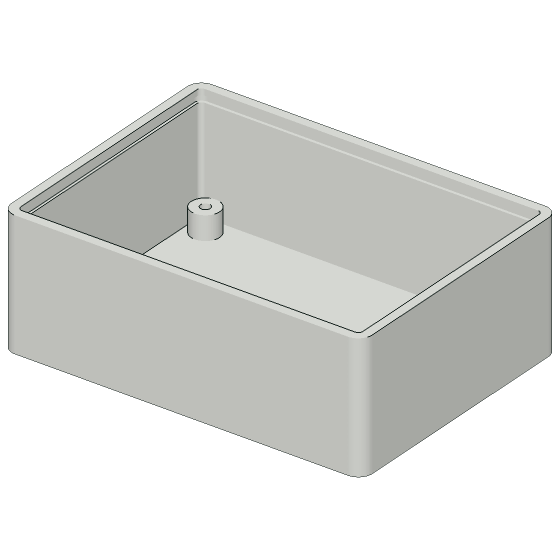
Enclosuremeasured 76 × 56 × 27 mm, lid not shown
Saved results of these exact requests.
Try it yourself, no sign-up
A real part from the library. Move a slider and our server rebuilds the solid and measures it again.
What you asked for, and what we checked
Every request is split into the things it asks for. Each one is checked on the finished solid, and anything we could not check is marked.
Box for 18650 batteries holding 4 cells in a row, 2 mm walls, open top
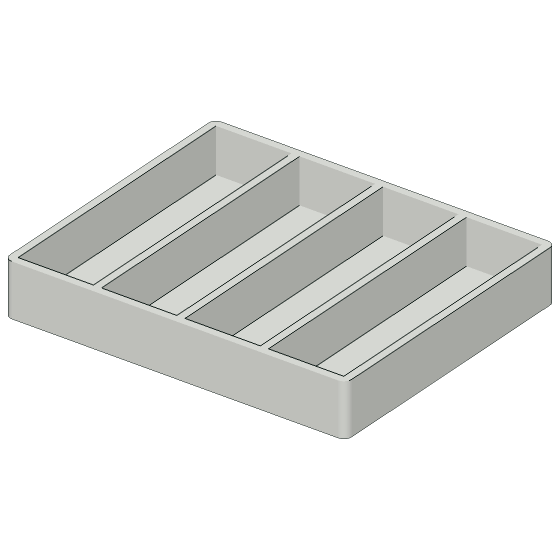
- Holds 4 cells in a rowMeasured: Counted 4 separate pockets in a cut through the box.
- Fits 18650 cellsMeasured: Length measured 84.4 mm, the least that four cells and their walls need.
- 2 mm wallsMeasured: Thinnest wall measured 2 mm.
- Open topNot measured: Built as asked, but no automatic check covers it. We say so, and you look at it in 3D before printing.
What it assumed, written out for you
- 18650 cell taken as 18.6 mm diameter x 65 mm long (nominal 18 x 65 plus margin).
- Pocket length is cell length + 1 mm clearance; no space for contacts or wiring.
- Floor thickness 2 mm (same as walls).
The parts library
Loading the library
Text to STL and STEP: an exact solid, not a mesh
Most 3D files for printing are a skin of triangles. TypePart builds a real solid with a CAD kernel, the way a CAD program does, and exports it as STEP as well as STL.
STEP opens as a solid body in Fusion, FreeCAD, SolidWorks, Onshape and most other CAD programs, where you can keep working on it.
Hose adapter 25 to 19 mm, from a saved request. Thinnest wall measured 1.9 mm.
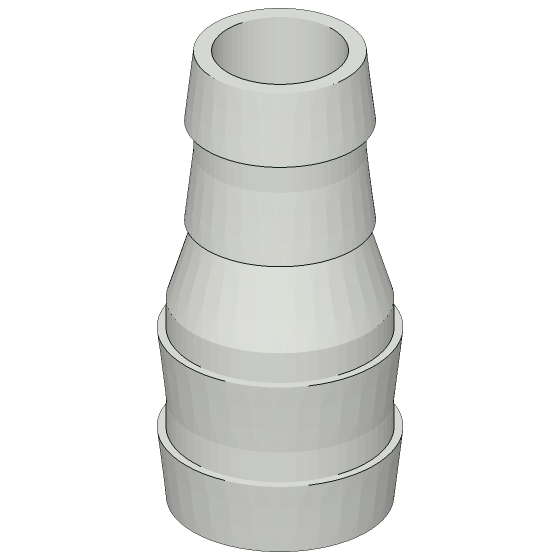
A closed solid with exact flat, round and conical faces.
What people make with it
Repair and replace
A broken foot, cap or clip that nobody sells on its own.
Electronics
Cases, standoffs and mounts sized to your board.
Workshop and storage
Inserts, holders and trays that fit the drawer you have.
Mounts and adapters
Brackets, wall mounts and adapters between two sizes.
How text to CAD works here
Describe it
Write what the part is for and the sizes that matter. Generating and previewing are free.
Check and adjust
Turn the part in 3D, read its measured size and thinnest wall, and change any dimension with a slider.
Download
Get STL for your slicer and STEP for any CAD program. A credit is spent only now, once per part.
Your first part is free
Generating parts and turning them in 3D cost nothing. A new account gets 1 credit, enough to download its first part as STL and STEP. After that a part is $5, or $15 a month for 30 parts.
What it does well, and what it does not do yet
Good at
Functional parts made of flat faces, holes and round features: L and shelf brackets, boxes and bins, electronics enclosures with standoffs and snap lids, hose and pipe adapters, spacers, plates with hole patterns, clips, hooks and knobs.
Not yet
Screw threads, gears from a description, hinges and other moving joints, springs, sculpted or organic shapes, and lettering. When you ask for one of these, TypePart says so instead of guessing.
Questions
What is text to CAD?
Text to CAD turns a written description of a part into a CAD model. With TypePart you describe a functional part, such as a bracket or an enclosure, with the sizes that matter, and get an exact solid that you can change with sliders and download as STEP or STL.
Is this an AI CAD generator?
Yes. An AI model reads your description and writes a parametric design, and a CAD kernel builds the solid from it. The solid is then measured against what you asked for, and anything that could not be checked is marked. Every part is a starting point: check its dimensions before you print.
Can it make STL files for 3D printing?
Yes. Every part downloads as STL for your slicer and as STEP for CAD programs, so it also works as an AI STL generator. STEP holds the exact solid, so round holes stay round and faces stay flat.
Can I change the part in my own CAD program?
Yes. The STEP file opens as a solid body in Fusion, FreeCAD, SolidWorks, Onshape and most other CAD programs, where you can cut, extend and add to it. It holds the shape, not a feature history. In TypePart itself you change the named sizes with sliders.
What can it not make yet?
Screw threads, gears from a description, hinges and other moving joints, springs, sculpted or organic shapes, and lettering. When a request needs one of these, TypePart says so instead of guessing.
Do I need an account?
No for your first try: you can generate a part without signing in, once a day. An account gives you 1 free credit, enough to download your first part.
Can I sell what I print?
Library parts and your own parts can be used for personal and non-commercial projects on every plan. Selling printed parts needs the commercial license, which comes with Pro. The CAD files themselves may not be resold.
Can I get a refund?
Unspent credits bought once can be refunded within 14 days of purchase. Spent credits are not refundable. A subscription can be cancelled at any time and stays active until the end of the paid period.
Are some parts not allowed?
Yes. Parts meant to hurt people, to get past locks or to commit fraud are refused, and every request is screened. The full list is in the terms. Read the terms.